Health · Europa Today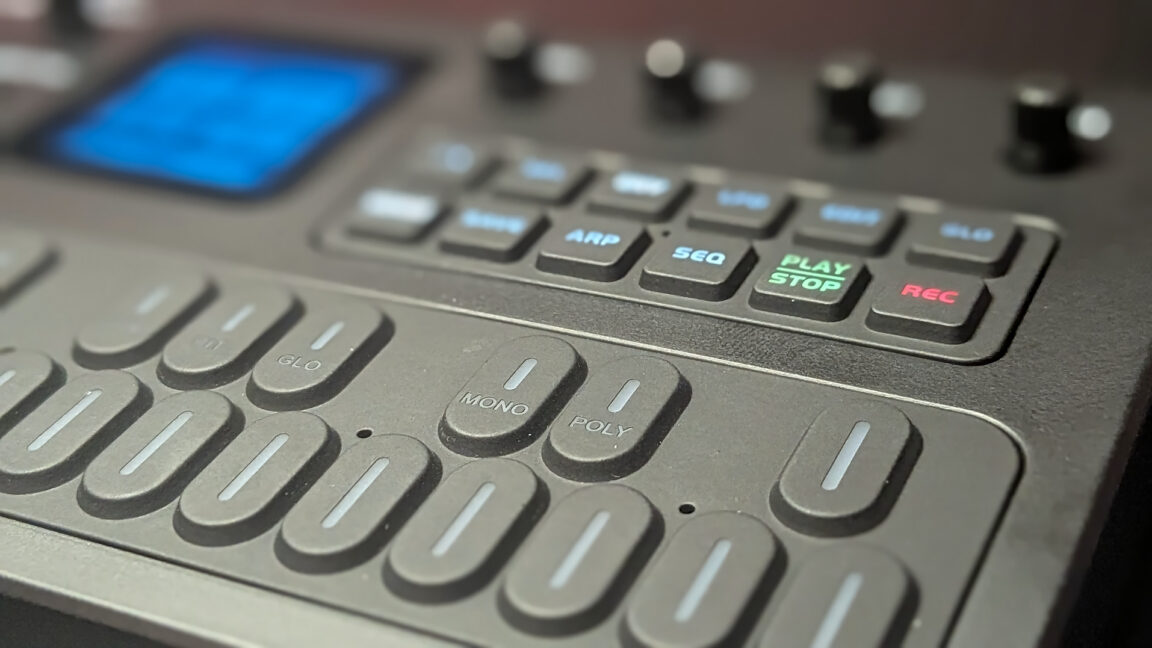
Pocket rocket M-Vave’s cheap FM-1 pocket synth has exploded as a community firmware playground. Credit: Nick Indge The M-Vave FM-1 is exactly the kind of device I have a weakness for. I may not have an intended use for the frequency-modulation synthesizer, but when a low price meets a high coolness factor, I’m powerless to keep it out of my cart.
Initially billed as a pocket cousin of the famous Yamaha DX7 synthesizer, the FM-1 is a bargain at only $59.72 after fees. At release, it was a cool device that did what it said on the box, but not much else. But in July, some intrepid tinkerers on Reddit’s r/synthdiy board began reverse-engineering the FM-1’s stock firmware to expand the device’s abilities.
By September, custom firmware began appearing. We’re not even through October, and there are already more community firmware projects available to install on the FM-1 than I could ever hope to cover. I decided to check a few of them out.
And just in case you were wondering: Yes, it plays Doom . Stock firmware and FM1 Open On October 17, M-Vave announced FM 1 Open, a software package that encourages FM-1 owners to develop custom firmware for the synth-turned-whatever-else-you-can-imagine. Alongside the FM1 Open package came an SDK, a browser-based workbench, and version 15 of the stock firmware, now an open platform you can flash and build on.
The unit’s 27 physical piano keys and modest 1.54-inch TFT display lend themselves well to a host of projects, musical or otherwise. Normally, when an enthusiast community reverse-engineers a closed device, an official patch quickly follows. M-Vave has taken the opposite approach, though.
The application source is published under GPLv3 , and the company even includes an in-browser emulator to test custom firmware prior to flashing actual hardware. There’s a caveat, however: The underlying synth engine that powers the stock FM-1 package is still distributed as a closed binary, so it’s the application layer of the stack that’s actually open. I don’t think that diminishes M-Vave’s gesture toward the community, but it’s worth noting.
Proceed at your own risk Before you rush to AliExpress, be aware that flashing custom firmware comes with risks. The JieLi chip powering the FM-1 keeps firmware in a single flash bank, so an interrupted update can leave the device in a difficult-to-recover state. As long as the flashing process completes without interruption, you should be fine.
But nothing is foolproof, and there’s always a risk of bricking a device if something goes wrong. You will need to grant permission for your browser to write to the FM-1. You will need to grant permission for your browser to write to the FM-1.
Flashing will also wipe all information on the device. Before you try to load a new firmware package on the synth, back up your saved projects and settings because they will disappear. I was starting from a blank stock canvas, so there was no real risk.
The unit I received was running stock v14 firmware, and community guides repeatedly warn users to update to the stock v15 firmware before attempting to install custom firmware. Guess who didn’t listen? I blindly assumed that since I’d just received my FM-1, it would be running the latest firmware package (v16 now).
I was wrong. I attempted to run before I could walk. Don’t be me.
I attempted to run before I could walk. Don’t be me. Caught in the excitement, I tried to flash Doom directly onto the v14 firmware package, and the installation failed about 80 percent through.
Still, it wrote something. The synth worked, but the device stopped speaking the same language as the installers. Thankfully, M-Vave anticipated careless users like me and thoughtfully included a “force-flash” tool in the FM1 Workbench.
It restored my unit to stock v15 in about 10 seconds, saving me a huge headache. The lesson is simple: Always check your current firmware version. Custom firmware packages The development scene around the FM-1 is exploding, and new options are appearing all the time.
You can browse the listings to see what you might like to try, and a community tip from the fm1-custom-fw GitHub offers some good advice: While not an absolute hard rule, there is a prominent community recommendation to avoid flashing one custom firmware directly over another. To minimize bricking risks, some users suggest rolling back to the official stock firmware (v15) via M-VAVE’s official updater first, and only then flashing the next custom firmware build. Alternatively, you can use TransitFM1 —a dedicated lightweight bridge firmware by Quixotic7 designed with crash-guarded boot stubs and stock V15 identity emulation to safely transition between custom builds.
Some other tips I picked up along the way from community discussions and my own mistakes: Ensure that the FM-1 is fully charged and connected to your PC via USB. Use a Chromium-based browser for the package installation process. The installers depend on WebUSB and Web MIDI support in the browser, so options like Firefox are out.
Select the FM-1 from a list of available models where applicable. Use the package’s web-writer to flash the firmware to your FM-1. Do not unplug or power off the unit at any point during this process.
Make sure the PC you’re writing the package from isn’t at risk of going to sleep during the write. Here are some projects to try. Doom What better way to measure the value of any electronic device than asking, “will it run Doom ”?
Pen for scale. It’s so cute! Credit: Nick Indge Pen for scale.
It’s so cute! Credit: Nick Indge The FM-1 already has several Doom -related projects up and running. Playing on a 240 x 240 display with mini piano keys will never be my preferred way to take down demons with a shotgun, but that doesn’t make it any less cool to see the game running on a $60 synthesizer clone.
It’s a novelty, but the clone version played surprisingly well. The short draw distance means enemies occasionally pop out of nowhere, but who doesn’t love a jump scare while demon hunting? You can explore community Doom options through the fm1-editor directory .
Melodee While the stock firmware aims to re-create the Yamaha DX7 experience, Melodee takes its cues from the mid-’80s Casio CZ-1, a full-featured synthesizer that uses phase distortion to create a sound modern artists are still chasing. Melodee comes with four engines: a CZ-1 emulator, a DX7-style engine, a percussion engine for the 808s, and my personal favorite, a Commodore 64 SID sound chip emulator. The FM-1 loaded with the Melodee firmware package.
Credit: Nick Indge The FM-1 loaded with the Melodee firmware package. Credit: Nick Indge As a child of the 8-bit era, I’ve always had a soft spot for the amazing soundtracks built around the technological limits of the day. Composing chiptunes always seemed like an interesting hobby, but I never had the right tools.
Now, thanks to Melodee, I have a pocketable chiptune keytar I can take anywhere. Ready to make some beats? Credit: Nick Indge Ready to make some beats?
Credit: Nick Indge Want to re-create that classic Cash Money sound on a $60 budget? The FM-1 now has you covered—this could be your chance to become the next Mannie Fresh. Felucca This is where a capable device becomes the deal of the year.
Felucca is the foundation for many other community firmware projects, transforming the FM-1 into a true multi-engine synth. The stock firmware lets you select different instruments, but you can play only one at a time. Felucca runs independent instruments simultaneously, letting you create a full-band sound all by yourself.
Trying my hand at beatmaking inside Felucca. Credit: Nick Indge Trying my hand at beatmaking inside Felucca. Credit: Nick Indge Felucca includes more than a dozen sound engines, from phase distortion to virtual analog, plus a built-in sampler.
Other highlights include a RAW in-browser web editor that makes arranging tracks less painful than working on the FM-1’s tiny screen, and a full multi-track pattern sequencer built into the device. If you want to make music, this is a great place to start. SLOOP Boot logo for SLOOP.
Credit: Nick Indge Boot logo for SLOOP. Credit: Nick Indge SLOOP is the FM-1’s groovebox solution. Cards on the table: Before writing this article, I wasn’t familiar with what a groovebox was.
In a nutshell, it’s a self-contained music studio that can be operated without a PC. SLOOP turns the FM-1 from an instrument you play into one you compose with. You program drums and bass on a grid, chain loops together, and let the machine keep the beat going while you layer other sounds on top. 8-track recording environment in SLOOP.
Credit: Nick Indge 8-track recording environment in SLOOP. Credit: Nick Indge SLOOP adds drum machines and synth layers to the FM-1, running on Felucca’s sound engines. The result is a legitimate eight-track, battery-powered beat maker that fits in your pocket.
Unlike Felucca, SLOOP is designed more for live performance, letting you build and stack layers of sound as you go. I didn’t always fully understand how I arrived at the results I produced in SLOOP, but I was having too much fun to care. In the studio After exploring some of the available custom firmware packages, I decided to take my own advice and try Felucca as a starting point for actual recording.
I connected the FM-1 to my PC using the same USB connection I’d previously used for flashing. Audacity recognized Felucca immediately, and I was able to select it as a recording device. From there, I could select any instrument or effect on the device and record it live over USB to Audacity tracks.
That’s all well and good if you’re sitting at a desk with a PC, but what if inspiration strikes while you’re out and about? That’s where Felucca’s self-contained recording process shines. The FM-1 appears as a recording device in Audacity.
Credit: Nick Indge The FM-1 appears as a recording device in Audacity. Credit: Nick Indge Creating music entirely on the FM-1 was more intuitive than I expected. Once I pulled up the Felucca controls cheat sheet , the process was smooth: use the Algorithm knob to switch between recording tracks and Presets to switch instruments.
From there, I could build and layer my creation track by track. I put together a four-track beat loop after about 15 minutes of fiddling with the firmware. I just felt my way around in the dark, auditioning sounds and slipping them in wherever I thought they fit.
It was about as simplistic as it gets, but with some time and practice, I think I could churn out something worthwhile. If it was this straightforward for me, just imagine what someone with actual musical talent could achieve. I’ll admit that my fingers were occasionally too big for the task.
The FM1’s soft-touch keys feel great, but my index finger sometimes slipped off the intended note and onto an adjacent key. It’s not a dealbreaker, but there were a few times I had to retry a part due to hitting a wrong note. My finger would occasionally slip off the intended key.
Credit: Nick Indge My finger would occasionally slip off the intended key. Credit: Nick Indge Since there doesn’t appear to be an on-device export function, transferring the track to my PC was as simple as opening Audacity and hitting record while playing a beat on the FM-1. I retained live control throughout recording, too.
Toward the end of the sample below, you can hear me fading out the audio by turning down the master volume knob. The same approach would let you weave any number of live modulations into a recording. You can hear my modest attempt at a quick beat below.
Final thoughts The FM-1 is the type of technology I love. I’m the furthest thing from a professional musician, but the price is low enough and the device is versatile enough that I can play around without feeling guilty about a $1,500 synth setup gathering dust in the corner. My 10-year-old has been taking piano lessons for a few years now and has clearly inherited my urge to tinker with tech.
The FM-1 could be the perfect holiday gift he never knew he needed. I’ll probably order another one for him since I still want to play with mine. At this price, I don’t have to sweat it.
M-Vave didn’t send this unit for review; checkout curiosity just got the better of me. I’ve since ordered the company’s SMC-PAD sampler, too, but that’s another article for another day. Would I buy the FM-1 again tomorrow?
In a beat. Nick Indge is a Senior Technology Reporter at Ars Technica covering hardware, embedded systems, and self-hosted infrastructure. A former security investigator turned tech writer, he writes to help readers escape subscription traps and regain ownership of their digital lives.
He lives in Chicagoland with his family and a goofball husky. 9 Comments
Source: Ars Technica